

Вольтмодификая видеокарт RadeOn 9600 Pro/XT
Я поискал по сайтам вольт-модификационную карточку 9600. Нашел ссылку: www.uniod.net(пока она не работает, блин... <img src="http://cp.people.overclockers.ru/smiles/icon_sad.gif" border="0">).
<br/>Записывал на винчестере и скоприровал в страничку.
<br/><br/>[Sapphire 9600XT 128mb fireblade NON BBA PCB Vref + Vgpu] - added 3-26-04
<br/>
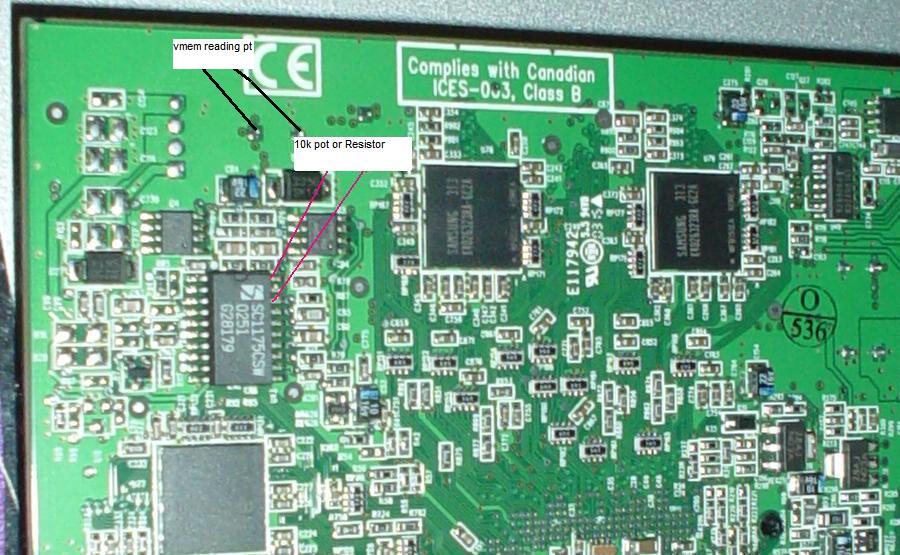
<br/>This pictures shows the Vgpu adn Vref mod locations for this card type. I am not sure of the exact resistor values needed but you will need to use a 10k or 15k Variable resistor. Set the resistance to high as it goes and boot up and record your voltage. The lower you make the resistance the higher Volts you'll get. Be care with the VREF and use a 15k pot until I update with new info. You c...
реклама
Я поискал по сайтам вольт-модификационную карточку 9600. Нашел ссылку: www.uniod.net(пока она не работает, блин...  ).
).
Записывал на винчестере и скоприровал в страничку.
[Sapphire 9600XT 128mb fireblade NON BBA PCB Vref + Vgpu] - added 3-26-04
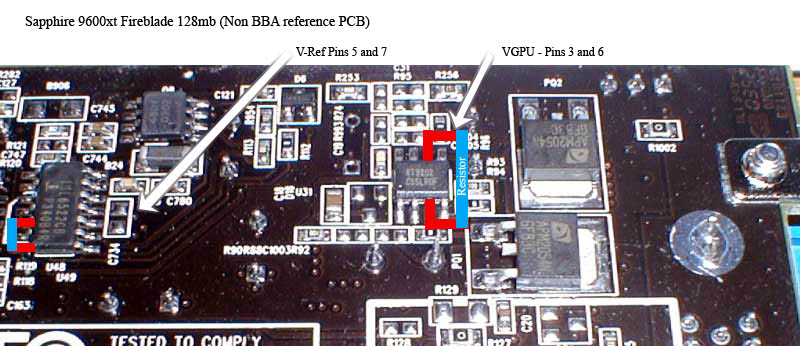
This pictures shows the Vgpu adn Vref mod locations for this card type. I am not sure of the exact resistor values needed but you will need to use a 10k or 15k Variable resistor. Set the resistance to high as it goes and boot up and record your voltage. The lower you make the resistance the higher Volts you'll get. Be care with the VREF and use a 15k pot until I update with new info. You can not increase the vref to above 1.40 - 1.50volts. This will seriously kill your card if you're not careful. The great people in this thread at Xtreme Systems Forums(http://www.xtremesystems.org/forums/showthread.php?s=&threadid=29820&perpage=25&pagenumber=1) Is where I have gathered this information and have barrowed some of their pictures. Head over if you got any extra questions on these mods.
If you are wondering where the voltage reading points are for the Vref look at the picture at this Link: http://www.unoid.net/9600pro/sapphire9600xt-nonBBA-volts.jpg
Note: the vref should work on other 9600's who have that identical chip.
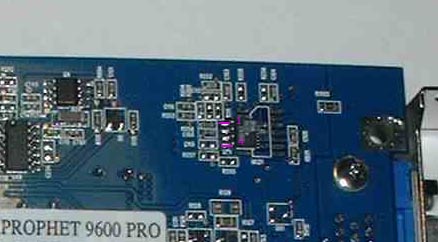
[Hercules 9600 Pro VGPU]
This little old mod is a tad different for some hercules 9600's. Apparently the gpu voltage chip is different. After checking out the chip design you simply solder a resistor to pins 1 and 4. The exact voltage obtained base don resistor I can not tell you off hand but start with a 12k and use your voltimeter to check.
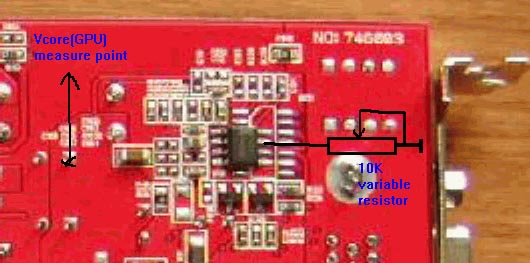
[Gigacube/gexcube 9600 Pro VGPU]
For the gigacube(gexcube) this picture should tell ya how to do the vgpu. I imagine the other end of the resistor goes to ground. Thanks to gymyfortefor the pic and mod.
[BBA PCB GPU Voltage (most common)]
A word of caution: Voltage mods can fry your card up easily if you do not know what you're doing. With that said lets begin. What you will be needing is a Voltimeter, soldering equipment, and resistors/potentiometers.
My stock ati card had 1.254V gpu and 2.753V mem stock. To read the voltage values on a reference card look at the following pics.
GPU Voltage points
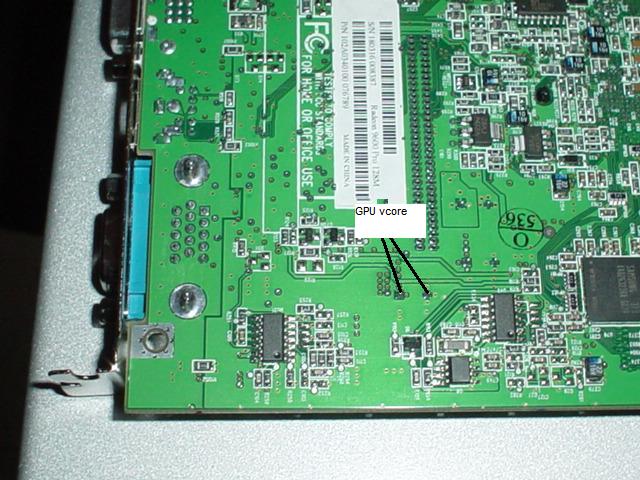
MEM Voltage points
The next step you need tot ake is calculate what value of resistance you need to apply to come out with the desired voltages. using 9.43k Ohms of resistance on the core gave me a 1.389V reading afterthe mod. If you decrease the resistance you will net higher voltages. a 7.8k Value resistance will give you roughly 1.4V. Going above 1.4v requires a better hsf. and going above 1.5v isn't such a good idea. For the memory lowering the resistance will also net you more volts. using a 12.23k ohm resistance resulted in a 2.91V to the mem. My samsung 2.86ns ram is specified to operate at 2.9V safely. DOing the vmem mod netting me 0 mhz. Other vref and etc. mods havne't worked for other people.
Some sample resistance -> voltages are: (thanks Jethrodude)
12k ohm = 2.88 vmem
10k ohm = 2.91 vmem
8.2k ohm = 2.95 vmem
6.9k ohm = 2.98 vmem
3.9k ohm = 1.52 vgpu
4.7k ohm = 1.48 vgpu
6.8k ohm = 1.4 vgpu
10k ohm = 1.36 vgpu
Now you need to know where to solder the resistor(s) or pots.
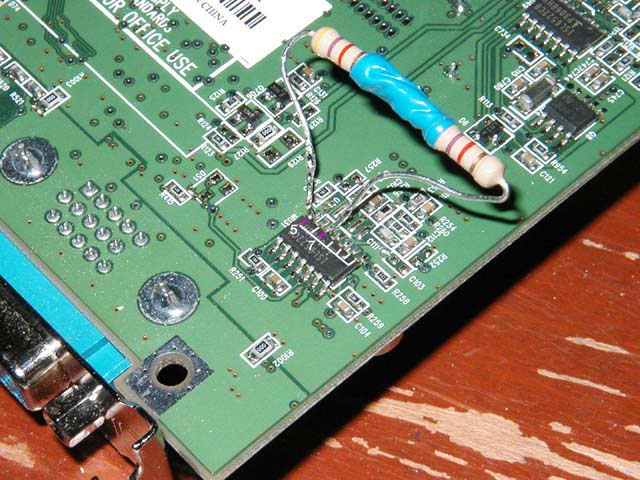
GPU Voltage Soldier points 5 and 7
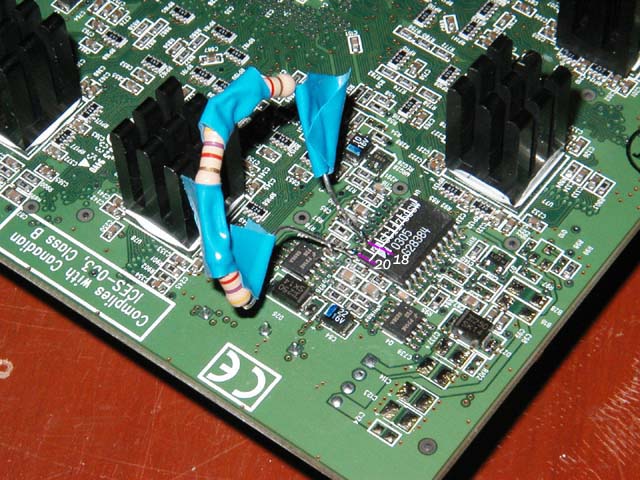
MEM Voltage Soldier points 18 and 20
Remember that not all 9600 pros will have the same layout. If you're card doens't look like my BBA 9600 pro I would check www.rage3d.com/forums and see first.
).
Записывал на винчестере и скоприровал в страничку.
[Sapphire 9600XT 128mb fireblade NON BBA PCB Vref + Vgpu] - added 3-26-04
This pictures shows the Vgpu adn Vref mod locations for this card type. I am not sure of the exact resistor values needed but you will need to use a 10k or 15k Variable resistor. Set the resistance to high as it goes and boot up and record your voltage. The lower you make the resistance the higher Volts you'll get. Be care with the VREF and use a 15k pot until I update with new info. You can not increase the vref to above 1.40 - 1.50volts. This will seriously kill your card if you're not careful. The great people in this thread at Xtreme Systems Forums(http://www.xtremesystems.org/forums/showthread.php?s=&threadid=29820&perpage=25&pagenumber=1) Is where I have gathered this information and have barrowed some of their pictures. Head over if you got any extra questions on these mods.
If you are wondering where the voltage reading points are for the Vref look at the picture at this Link: http://www.unoid.net/9600pro/sapphire9600xt-nonBBA-volts.jpg
Note: the vref should work on other 9600's who have that identical chip.
[Hercules 9600 Pro VGPU]
This little old mod is a tad different for some hercules 9600's. Apparently the gpu voltage chip is different. After checking out the chip design you simply solder a resistor to pins 1 and 4. The exact voltage obtained base don resistor I can not tell you off hand but start with a 12k and use your voltimeter to check.
[Gigacube/gexcube 9600 Pro VGPU]
For the gigacube(gexcube) this picture should tell ya how to do the vgpu. I imagine the other end of the resistor goes to ground. Thanks to gymyfortefor the pic and mod.
[BBA PCB GPU Voltage (most common)]
A word of caution: Voltage mods can fry your card up easily if you do not know what you're doing. With that said lets begin. What you will be needing is a Voltimeter, soldering equipment, and resistors/potentiometers.
My stock ati card had 1.254V gpu and 2.753V mem stock. To read the voltage values on a reference card look at the following pics.
GPU Voltage points
MEM Voltage points
The next step you need tot ake is calculate what value of resistance you need to apply to come out with the desired voltages. using 9.43k Ohms of resistance on the core gave me a 1.389V reading afterthe mod. If you decrease the resistance you will net higher voltages. a 7.8k Value resistance will give you roughly 1.4V. Going above 1.4v requires a better hsf. and going above 1.5v isn't such a good idea. For the memory lowering the resistance will also net you more volts. using a 12.23k ohm resistance resulted in a 2.91V to the mem. My samsung 2.86ns ram is specified to operate at 2.9V safely. DOing the vmem mod netting me 0 mhz. Other vref and etc. mods havne't worked for other people.
Some sample resistance -> voltages are: (thanks Jethrodude)
12k ohm = 2.88 vmem
10k ohm = 2.91 vmem
8.2k ohm = 2.95 vmem
6.9k ohm = 2.98 vmem
3.9k ohm = 1.52 vgpu
4.7k ohm = 1.48 vgpu
6.8k ohm = 1.4 vgpu
10k ohm = 1.36 vgpu
Now you need to know where to solder the resistor(s) or pots.
GPU Voltage Soldier points 5 and 7
MEM Voltage Soldier points 18 and 20
Remember that not all 9600 pros will have the same layout. If you're card doens't look like my BBA 9600 pro I would check www.rage3d.com/forums and see first.
Лента материалов
Правила размещения комментариев
Соблюдение Правил конференции строго обязательно!
Флуд, флейм и оффтоп преследуются по всей строгости закона!
Комментарии, содержащие оскорбления, нецензурные выражения (в т.ч. замаскированный мат), экстремистские высказывания, рекламу и спам, удаляются независимо от содержимого, а к их авторам могут применяться меры вплоть до запрета написания комментариев и, в случае написания комментария через социальные сети, жалобы в администрацию данной сети.


